Compare
Dellro vs cloud drives for delivering wedding films
A cloud drive is a good place to store and share files, but it shows a wedding as folders and previews rather than a film to sit down and watch. Dellro gives each wedding its own branded gallery that streams in up to 4K, plays on the TV and keeps every original in three protected copies.
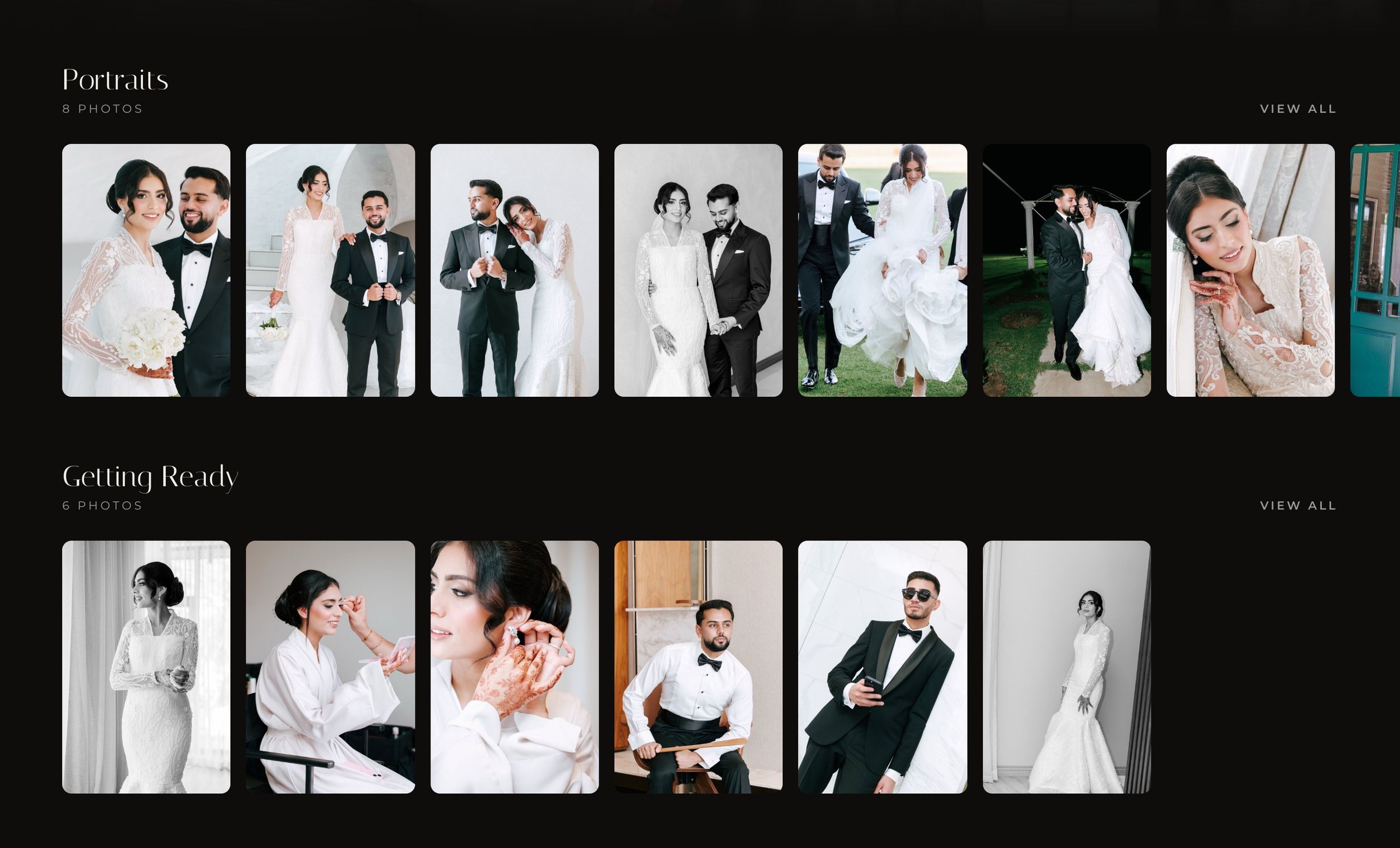
Sharing a drive folder is often the first upgrade from a transfer link, because the files stay put. The trade-off is presentation and control. The couple sees file names and thumbnails, previews are often compressed, and the shared folder lives inside your own storage account, so your storage and your deliveries are tied together.
| Cloud drives | Dellro gallery | |
|---|---|---|
| Presentation | Folders, file names and thumbnails | A gallery home with films in rows and photo sets |
| Playback | Often a compressed preview player | Adaptive streaming up to 4K, with chapters and captions |
| On the TV | Usually download or cast a preview | TV page with a 6-character code, plus AirPlay and Chromecast |
| Sharing | Folder permissions that can be confusing to guests | Clear options from open link to personal guest codes |
| Storage | Usually counts against your own account | Yearly upload allowance; delivered weddings never use next year's |
| Branding | Usually the drive's own look | Your logo, colours and fonts, plus your own domain from the Studio plan |
| File safety | Often one copy, managed by you | Three copies, fingerprinted, checked weekly, rebuilt if damaged |
| Photo selection | Usually comments or a list by email | Favourites: clients heart photos and send the list (paid plans) |
When a cloud drive is fine to use
- Working files shared between your own team or editors.
- Contracts, timelines and planning documents.
- A temporary handover where presentation does not matter.
When a delivery gallery is better
A wedding film deserves a cinema, not a folder. In a Dellro gallery the couple opens one link and sees their films presented like a streaming service, with every photo set right beside them. Playback starts at a lower rung and steps up as the connection allows, so it works on hotel wifi and on a big TV alike.
- Delivery is separate from your storage. Your allowance counts what you upload in a year, not what is stored.
- Originals are protected. Each file is stored three times, including a locked copy that cannot be deleted or changed during its lock period. See three-copy protection.
- Guests just get in. Choose a password, personal codes, or email sign-in for the people you invite.
- It looks like you. Your branding and your own domain, with no platform credit on Studio and Signature plans.
What changes for the couple
The couple no longer has to understand folders or permissions. They open one link, see their films and photos presented beautifully, and press play. If they want to keep files, you decide whether downloads are on: originals are downloadable for 12 months from gallery creation, then films download in 1080p and photos in web size, while streaming continues for at least three years. On your side, nothing needs reorganising each time you clear space on your drive, because the delivery no longer depends on it.
Uploads are built for wedding-sized files too. Each file can be up to 500 GB, uploads go in parts and resume after a dropped connection or a closed browser, and duplicate files already in the gallery are not stored twice.
How to move over
- 1Export your finished deliverablesKeep project files on your drive. Bring only the films and edited photos the couple should receive.
- 2Upload the whole folderFolder upload keeps subfolders as photo sets, such as Getting Ready, Ceremony and Reception. Duplicate files are not stored twice.
- 3Brand it onceSet your logo, colours and fonts, then save a gallery template for future weddings.
- 4Share with the right peoplePick the access level, choose download settings and send.
Your drive stays your workspace, and the gallery becomes the couple's home for their wedding. Read how long to keep wedding footage for a retention plan, or see pricing.
Questions
- Does Dellro replace my own backups?
- Dellro keeps three copies of each uploaded file and re-checks them weekly. Many studios still keep their own project archive, since Dellro stores the deliverables you upload.
- Does stored footage use up my allowance every year?
- No. The allowance counts what you upload in a year, not what is stored, and delivered weddings never use next year's allowance.
- Can I upload a whole folder of photos?
- Yes. Folder upload keeps subfolders as photo sets, and each set gets a slideshow, lightbox and its own ZIP download.